
Start With The Business Outcome.
More website traffic is useful when it brings people who need what you offer. Before deciding how much to invest in SEO, it helps to connect additional visits with enquiries, sales and the amount your business keeps after delivering the work.
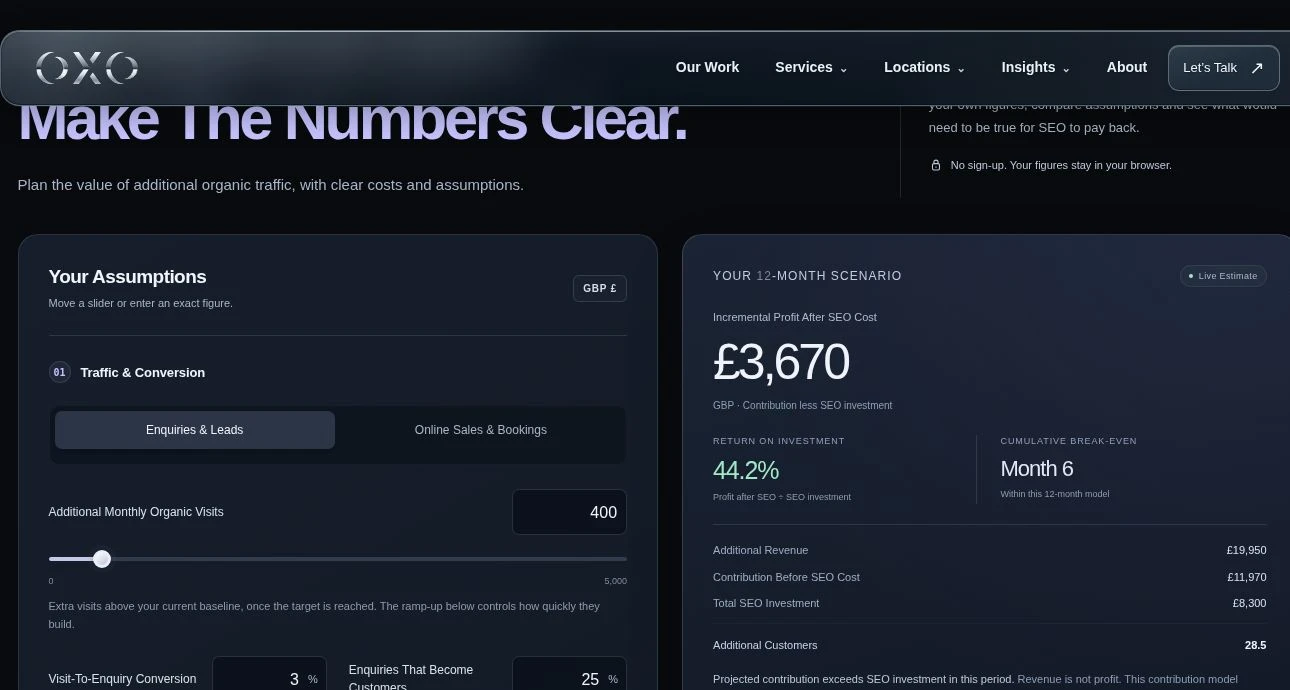
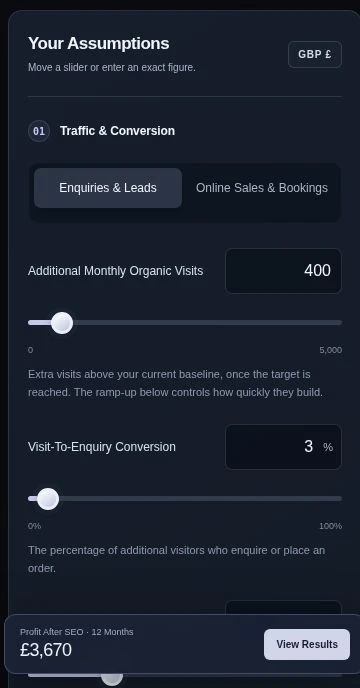
Our free SEO return-on-investment calculator makes those assumptions visible. It supports lead generation and online sales, includes initial and monthly SEO costs, and shows how a gradual traffic increase affects the result over time. You can move a slider, type an exact value and download the scenario as a CSV. The main return figures stay in a compact panel; choose View Chart & Monthly Breakdown to explore the timing in more detail.
The output is a planning scenario built from your inputs. It does not predict a ranking, read live keyword volumes or guarantee new customers. Its value is in helping you see which assumptions have the biggest effect on the commercial case.
Revenue And Return Are Different.
Suppose a new customer brings £700 in revenue and the contribution margin is 60%. The business has £420 left after the variable cost of delivering that sale, before SEO cost. Comparing the full £700 with the SEO bill would overstate the return.
SEO ROI = (incremental contribution − SEO investment) ÷ SEO investment × 100.
“Incremental” means additional business above your existing baseline. Contribution is revenue less the delivery costs included in your margin. The final result is contribution after SEO investment; it is not the company’s accounting net profit.
Build The Scenario In Four Steps.
1. Choose The Customer Journey.
Select Enquiries & Leads if a visitor usually calls, submits a form or requests a quote before buying. The model follows visits through enquiry conversion and then the percentage of enquiries that become customers. Select Online Sales & Bookings when the website completes the order; that model uses visit-to-order conversion directly.
Enter the additional monthly organic visits you want to test once the campaign reaches its target. If the website already receives 1,000 relevant visits and you are modelling growth to 1,400, the additional input is 400.
2. Enter The Value You Actually Earn.
Use revenue from a typical new customer, order or engagement, with a consistent tax treatment. An estate agency should use its commission or fee, rather than the property’s sale price. A business taking a booking on behalf of a partner should use the revenue it earns and account for partner costs consistently.
Then set the contribution margin after product costs, delivery labour, fulfilment, payment fees and other variable costs you include in the scenario. Avoid deducting the same cost both from customer revenue and again through the margin.
3. Include The Full SEO Investment.
Enter the monthly cost and any initial audit, setup or implementation cost. Include content, development and internal time when those are part of the effort needed to achieve the scenario. These example fields are editable assumptions; they are not prices for OXO’s SEO packages.
4. Set The Ramp-Up And Planning Period.
The ramp-up is a simple, even build. With six months to target, the model reaches one-sixth of the additional traffic in month 1, two-sixths in month 2 and the full target from month 6. It then holds that target steady until the end of the chosen planning period.
This is a mathematical assumption, not a claim about how quickly SEO works. A new site, an established service page and a business with a lengthy sales process may require very different scenarios. The model does not separately delay cash collection after a lead converts.
Use Your Own Data To Improve The Inputs.
Start with a clearly defined baseline and comparable periods. Google Search Console’s Performance report shows search clicks, impressions, average click-through rate and position, with ways to examine queries and pages. Use it to understand which searches already bring people to the website. A search click and an analytics session are different measures, so choose a consistent basis for the visit and conversion assumptions.
Use website analytics for enquiries or completed orders, then connect leads with the sales outcomes recorded by your business. A form submission is not automatically a paying customer. Measure qualified enquiries and completed sales over a suitable period, especially where the sales cycle is long. OXO can help establish website analytics and enquiry measurement when that connection is missing.
Research Additional Search Demand Carefully.
The calculator includes local keyword examples and an optional helper: your monthly search estimate multiplied by an assumed increase in click share. For example, 8,000 relevant monthly searches with five percentage points of additional click share gives 400 additional visits. Neither input is supplied as measured demand by the calculator.
Check geography, language, period and overlapping terms when using keyword research. Google’s Keyword Planner documentation explains the settings and historical metrics behind its search estimates. Those estimates are a research input, not a promise of organic traffic. Do not add several close variants as if every number represents entirely separate demand.
Choose The Local SEO ROI Calculator.
Location changes the currency, search context and way a business earns revenue. Each version uses the same transparent calculation with distinct local examples and starting assumptions. Switching location opens a fresh scenario; it does not convert your figures or apply an exchange rate.
Gibraltar SEO ROI Calculator
Local service enquiries, customer value and SEO investment in pounds.
Open Calculator EUR · Local Keyword ExamplesSotogrande SEO ROI Calculator
Property commissions, specialist services and bookings in euros.
Open Calculator EUR · Local Keyword ExamplesMarbella SEO ROI Calculator
Local and multilingual searches, enquiries and online sales in euros.
Open Calculator AED · Local Keyword ExamplesDubai SEO ROI Calculator
City and district search scenarios, customer fees and SEO costs in dirhams.
Open CalculatorGibraltar: Local Enquiries In GBP.
The Gibraltar SEO ROI calculator uses pounds and examples for professional services, marine and visitor businesses, and local retail. Keep Gibraltar-specific demand separate from a wider UK or Spanish campaign. Explore SEO services in Gibraltar when you are ready to connect a scenario with a scope of work.
Sotogrande: Property Fees And Specialist Services In EUR.
The Sotogrande SEO ROI calculator in euros helps frame property enquiries, home services and lifestyle bookings. For property work, commission and closing rate are essential inputs. Separate language or service scenarios when their customer journeys differ, and connect them with your Sotogrande website and digital strategy.
Marbella: Local Search Intent And Seasonality In EUR.
Use the Marbella SEO ROI calculator for euro-based scenarios covering local services, property and hospitality. Terms involving Puerto Banús or Nueva Andalucía should match the areas you serve. Compare quieter and busier periods rather than extending one peak month across a year. Our Marbella SEO services page explains the wider approach.
Dubai: Campaign Scope And Customer Value In AED.
The Dubai SEO ROI calculator in AED includes business-service, district-property and visitor-booking examples. Be clear whether the audience is Dubai-specific, UAE-wide or international. Use consistent dirham values and compare each campaign on its own economics. Read about SEO and AI visibility for Dubai businesses.
Compare Assumptions, Not Just The Headline Number.
Build a cautious scenario first. Reduce additional traffic, lower the conversion rate or extend the ramp-up, then examine whether the investment is still manageable. Create a working scenario based on the strongest evidence you have, and a higher-growth case to understand what improved performance could be worth.
Change one input at a time when exploring sensitivity. That makes it easier to see whether the case depends mainly on traffic growth, lead quality, customer value or delivery margin. Download each scenario and label it with the date, source of the inputs and the assumption you changed.
The editable GBP starting example: 400 additional monthly visits at target × 3% enquiry conversion × 25% closing rate gives three additional customers per target month. At £700 revenue and 60% contribution margin, that is £1,260 monthly contribution before SEO cost.
With a six-month ramp and a twelve-month period, the model includes £11,970 of contribution. Initial cost of £500 plus twelve monthly investments of £650 totals £8,300. The difference is £3,670, or about 44.2% ROI. These are illustrative figures, not a forecast for a Gibraltar business or an OXO quotation.
Small expected customer counts can produce fractional averages. A model showing 2.5 customers does not predict half a sale; it expresses an average implied by the conversion assumptions. Actual outcomes may be uneven, especially for high-value transactions.
Turn The Scenario Into A Measurement Plan.
Read the return alongside the cost and break-even period. The calculator’s break-even month is the first point where cumulative contribution covers cumulative SEO investment. It is not a promise about the date money arrives in the bank. If the model never reaches break-even within the period, test whether the inputs, budget or proposed scope need to change.
Agree what will be measured before work begins: relevant organic traffic, qualified enquiries or orders, completed sales, customer revenue and the costs attributable to the campaign. Review those figures against a consistent baseline and consider other changes that may affect results, such as prices, paid campaigns, seasonality or changes to the website.
SEO planning works best when the numbers support a specific set of actions. Use the calculator to ask better questions, then connect the scenario to a technical review, relevant content and a clear measurement process. Explore OXO’s SEO and AI visibility services or discuss your website and SEO goals with OXO.