
What To Include In A Sotogrande Estate Agency Website Brief
Use two real listings to specify your search, property feed, languages and viewing enquiries before you ask for a website quote.
Start With Two Real Listings.
Choose a resale home and a rental your team has permission to use. Put the agency’s reference, area, price, availability and photographs for each in a folder. Ask the person who takes the calls to walk through the last enquiry about each property. Where did they have to stop and ask for more detail?
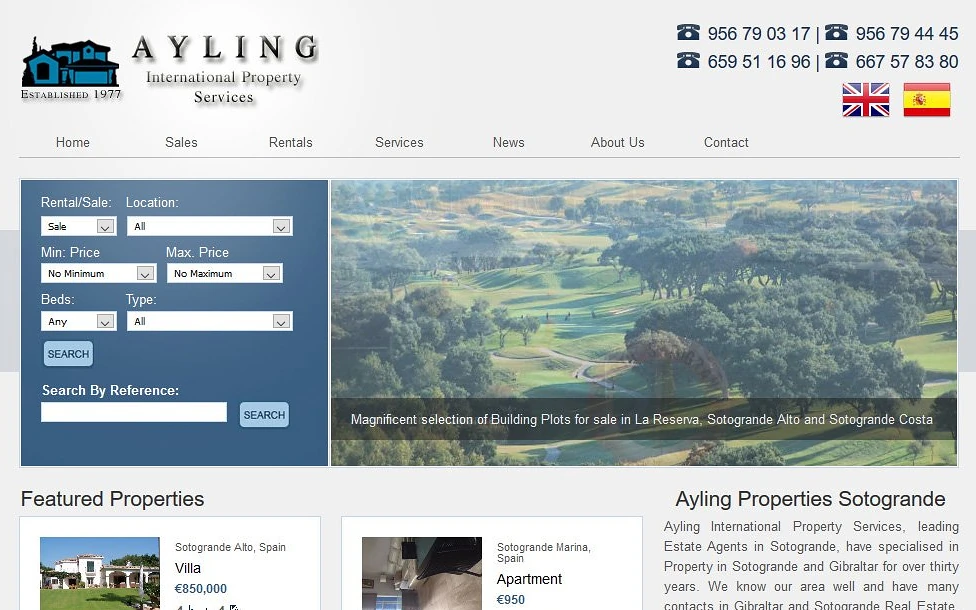
Ayling Properties gives us a local example. OXO designed the logo, website and property system for its Sotogrande rentals and resales. The archived site let visitors filter the catalogue or enter a known reference. Those are two different starting points to test in a new brief. See both in the Ayling project.
Write Down What A Visitor Needs To Find.
Try two example requests against your current listings. A buyer asks, “I have the reference for a home in Sotogrande Alto. Can I see it on Friday?” A rental enquiry says, “We’d like somewhere in the Marina for these dates. What’s available for four guests?”
- Sales. Start with reference search, area, purchase budget and bedrooms. Agree what happens if the home is reserved between the first visit and the viewing request.
- Rentals. Give the rental price a unit, such as per week or per month. Say who confirms availability. Include arrival and departure dates where the team needs them.
Use the area names under which the agency actually lists stock. If staff use different names for the same place, agree one label for search and one rule for matching incoming listings.
Agree Who Controls The Listing Data.
Pick one property and follow a price change from the negotiator’s desk to the website. Name the system that owns the price, who can update it and how quickly the change should appear. Repeat the exercise for a withdrawn listing. Describe what a visitor should see if they open yesterday’s saved link.
Give the developer a sample feed or export with permission to use it. Mark mandatory fields, the stable reference and any details reserved for staff. If listings come from several sources, decide how the team will recognise the same property twice.
Specify The Languages And The Branding.
List the languages your team can maintain and answer enquiries in. Assign someone to approve each translation. Ask to see a language switch on one listing so you can check it opens the same property, keeps the reference and preserves the price unit.
Supply the approved logo, colours, photography rights and an example of how your agency presents a home. Test the logo on a phone beside a long listing title. The reference and price should still be legible at a glance.
Define A Successful Viewing Request.
Sketch the message the agent should receive. For a sale, it might read “Viewing request · reference ST-014 · Friday afternoon · please call me”. For a rental, use the property reference, dates, party size and preferred contact method. Choose the fields your team will use in its first reply.
Record who receives each type of enquiry and who covers absences. For the launch check, send one agreed test of each type from a phone. Confirm the right person receives the right reference and that the visitor knows when to expect a reply.
Send The Same Brief For Each Quote.
Include your two listings, feed sample, language owners, brand assets and example enquiry messages. Ask each supplier to price the initial build, data import, ongoing feed support and maintenance separately. A quote is easier to compare when it says who will deal with a failed overnight update and which checks are included before launch.
Our Sotogrande property website service explains how we scope the build. The local cost guide sets out which running costs to allow for.